How payments and payouts work
Buyers pay into your own Stripe, PayPal, Razorpay or Coinbase account. TEE takes 0% and never holds your money.
Elite Store uses your own payment account. When a buyer pays, the money settles straight into that account, and that company pays out to your bank on its normal schedule. TEE is never in the middle, so there is no TEE payout to wait for.
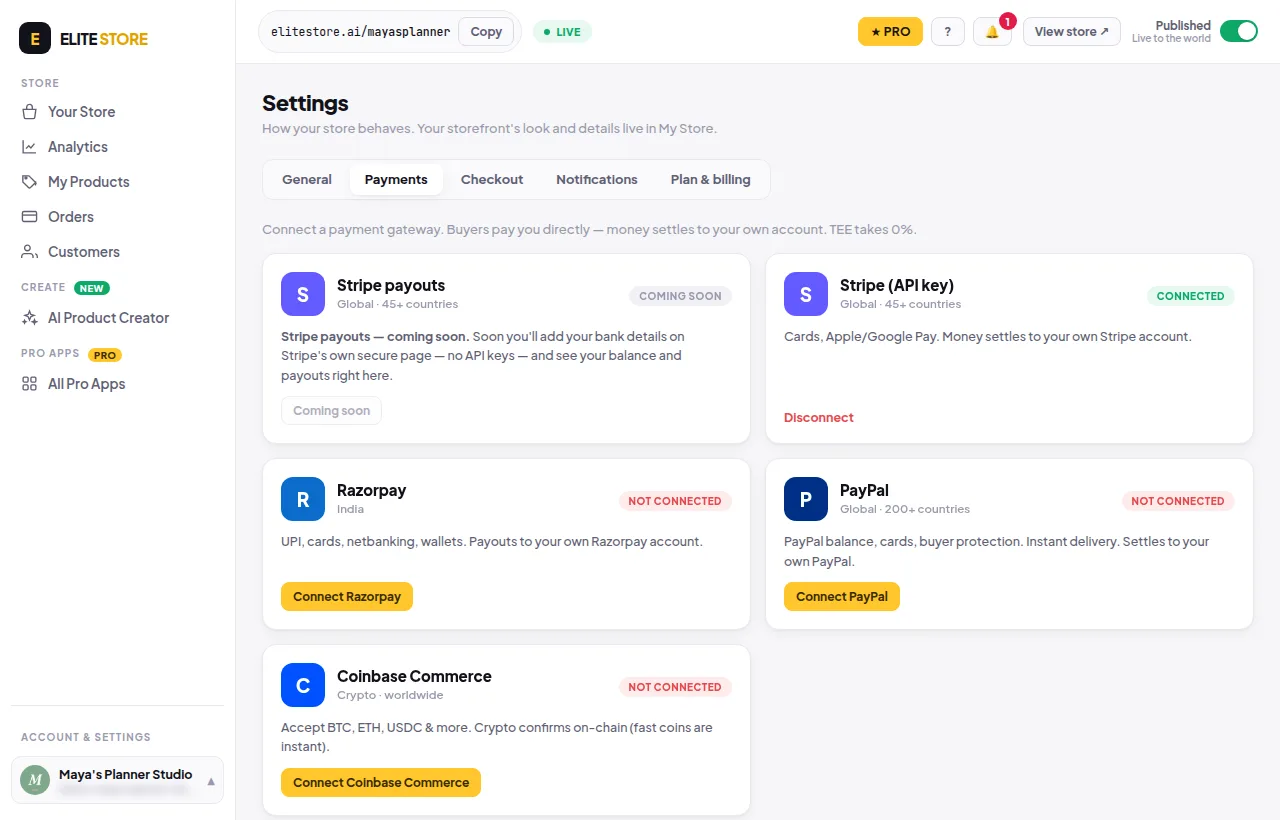
- Click your store name at the bottom of the left menu, then Store settings → Payments.
- Pick a payment company and click its Connect button.
- Paste your keys and click Connect & verify. We check them straight away.
Which one to pick
- Stripe: cards, Apple Pay and Google Pay. Global (45+ countries).
- PayPal: PayPal balance and cards. Global (200+ countries).
- Razorpay: India. UPI, cards, netbanking and wallets.
- Coinbase Commerce: crypto (BTC, ETH, USDC and more), worldwide.
You can connect more than one. Buyers then choose how to pay at checkout.
💡
Fees: 0% to TEE on Free and Pro. You only pay your payment company’s normal fees. Stripe payouts (add your bank on Stripe’s own page, no keys) shows as Coming soon for now.
⚠️
Without a payment account, paid products show a grey Coming soon button and can’t be bought. Free products still work.
Was this helpful?Thanks for letting us know.
Questions? Email [email protected].