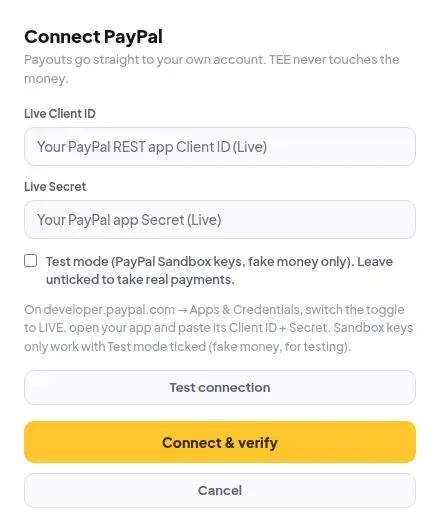
Connect PayPal
Paste your PayPal Live Client ID and Secret from developer.paypal.com. Sandbox keys only work in Test mode.
- Sign in at developer.paypal.com with your PayPal Business account.
- Open Apps & Credentials and switch the toggle to Live.
- Open your app (or create one) and copy its Client ID and Secret.
- In Elite Store, go to Store settings → Payments and click Connect on PayPal.
- Paste them into Live Client ID and Live Secret. Click Test connection if you like, then Connect & verify.
⚠️
Leave Test mode unticked to take real payments. Sandbox keys are fake money and only work with Test mode ticked. If PayPal rejects your keys, see PayPal keys rejected.
Was this helpful?Thanks for letting us know.
Questions? Email [email protected].