Connect Stripe
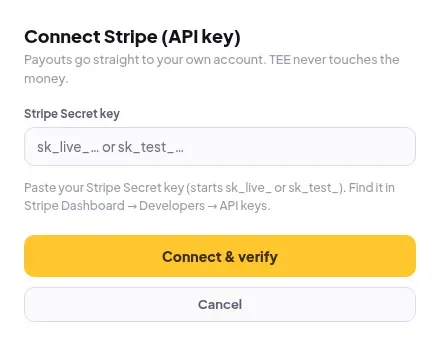
Paste your Stripe Secret key to accept cards, Apple Pay and Google Pay. Money settles to your own Stripe account.
- In Stripe, open Developers → API keys. Next to Secret key, click Reveal and copy it. It starts with
sk_live_. - In Elite Store, go to Store settings → Payments and click Connect on Stripe (API key).
- Paste the key into Stripe Secret key.
- Click Connect & verify.
💡
Want to test first? A test key (
sk_test_…) also works with Stripe’s test cards. No real money moves. Swap in your live key before you share your link.Turn on one-tap checkout
In Stripe, open Settings → Payment methods and switch on Google Pay, Apple Pay and Link. Your store shows them on supported devices automatically. There is nothing to set up in Elite Store.
⚠️
Keep your Secret key private. Only paste it into Elite Store. Keys are stored encrypted.
Was this helpful?Thanks for letting us know.
Questions? Email [email protected].